
Configuring Your Alliance: A Guide to Module Management
International alliances are diverse ecosystems. A single platform serves global steering committees, regional chapters, technical working groups, and administrative teams—each with different needs, workflows, and collaboration patterns. Forcing every group to navigate through the same complete feature set creates confusion and inefficiency.
This is where Module Management becomes essential.
Let’s say there was an international standards alliance with multiple types of groups. Their technical committees need proposal workflows and voting mechanisms. Regional chapters focus on membership and events. Administrative groups coordinate testing and certification. The executive committee handles strategic ballots. If every group sees every feature, the interface becomes cluttered with irrelevant options.
The Challenge: One Size Doesn’t Fit All
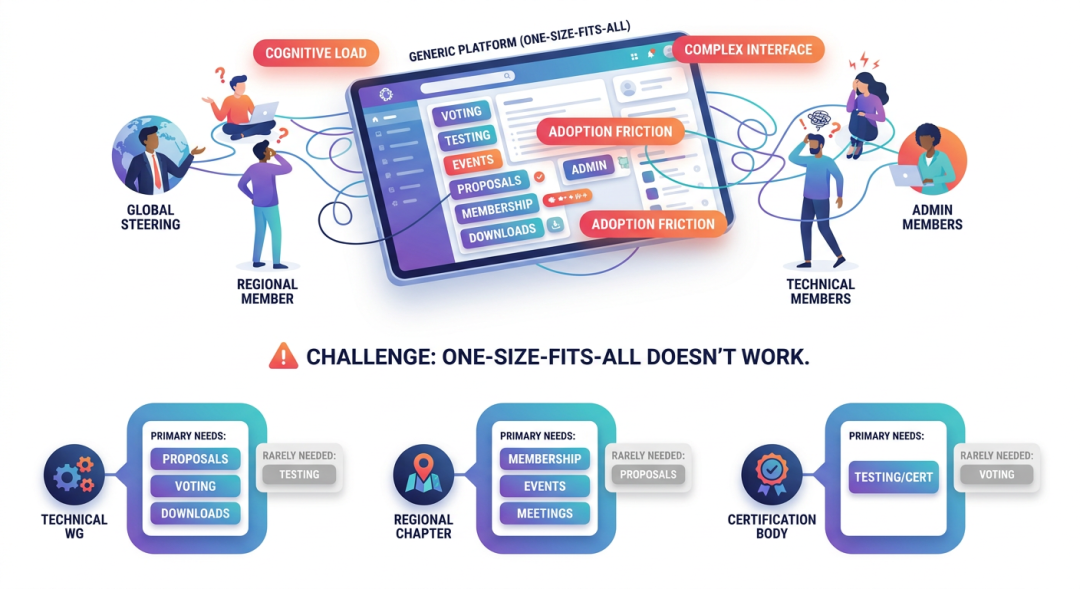 Traditional collaboration platforms often present all features to all users:
The problem with uniform interfaces:
- Interface complexity: Groups see features they’ll never use
- Cognitive overhead: Members navigate through irrelevant menus to find what they need
- Training burden: New members must learn the entire platform, not just what’s relevant to them
- Error potential: Members might accidentally use features in wrong contexts
- Adoption friction: Cluttered interfaces discourage engagement
Different groups have fundamentally different collaboration needs:
| Group Type | Primary Needs | Rarely Needs |
|---|---|---|
| Technical Working Groups | Proposals, Ballots, Downloads | Testing/Certification |
| Regional Chapters | Membership, Events, Meetings | Proposals |
| Certification Bodies | Testing/Certification | Ballots |
| Executive Committee | Strategic Ballots, Private Groups | Testing |
| Administrative Groups | Group Management, Applications | Ballots |
A standards body shouldn’t navigate through testing workflows. A regional chapter doesn’t need proposal management. Each group deserves an interface tailored to its purpose.
Solution: AllianceHub Module Management
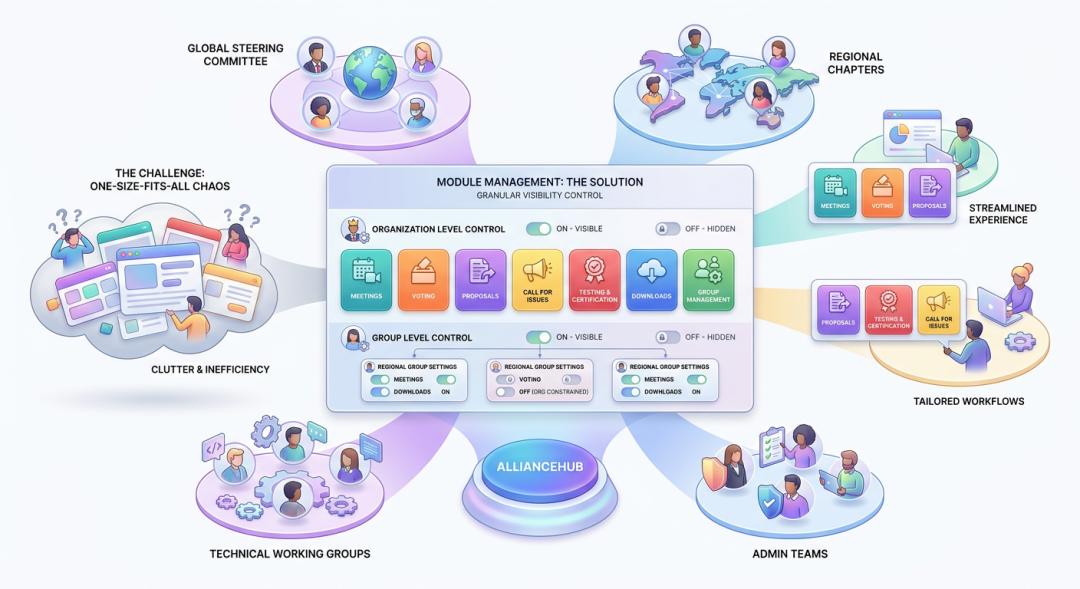 AllianceHub provides granular module visibility controls at both organization and group levels. Administrators can show or hide functional modules based on actual needs, creating streamlined experiences for each community.
What Are Modules?
Modules are AllianceHub’s functional components—the distinct capabilities that make up the platform:
Core Modules:
- Meetings: Schedule coordination, online meetings, agendas, recordings
- Ballots: Formal voting, surveys, decision-making workflows
- Proposals: Structured document workflows, review stages, cross-organization collaboration
- Topic Calls: Input collection, idea gathering, topic management
- Testing and Certification: Compliance workflows, certification management, audit trails
- Downloads: Document management, folder hierarchies, version control
- Group Management: Membership, subgroups, applications, permissions
Each module represents a complete functional area. Module Management determines who sees which capabilities.
Organization-Level Module Management
Who Controls: Organization Administrators
Scope: Affects all groups within the organization
Organization-level module management sets the baseline—what’s available across the entire alliance. This is particularly useful for:
1. Phased Rollouts When implementing AllianceHub, administrators might enable core modules first (Meetings, Downloads), then gradually introduce others (Testing/Certification, Topic Calls) as groups become ready.
2. Alliance Type Alignment Different alliance types need different capabilities:
- A standards alliance might enable Proposals, Ballots, Testing
- A research consortium might focus on Meetings, Topic Calls, Downloads
- A trade association might prioritize Ballots, Membership, Events
3. Governance Control Organization administrators can ensure certain capabilities are available alliance-wide or restricted to specific use cases.
Example Organization Configuration:
Organization: International Standards Alliance

Enabled Modules (Organization Level):
✓ Meetings (all groups need coordination)
✓ Ballots (democratic decision-making)
✓ Proposals (standards development)
✓ Downloads (document sharing)
✓ Group Management (membership)

Disabled Modules:
✗ Testing and Certification (only specific groups)

Result: Testing/Certification invisible to all groups unless explicitly enabled
Group-Level Module Management
Who Controls: Group Administrators (within organization-level constraints)
Scope: Affects only the specific group
Group-level configuration allows fine-tuning within organization boundaries. Even if a module is enabled organization-wide, groups can hide it if irrelevant to their work.
1. Focused Workflows A technical committee can hide Topic Calls if they only work through Proposals. A regional chapter can hide Testing if they never handle certification.
2. Progressive Complexity New groups start with basic modules (Meetings, Downloads). As they mature, administrators enable additional capabilities (Ballots, Proposals).
3. Role-Based Experiences Administrative groups see management modules. Working groups see collaboration modules. Leadership groups see governance modules.
Example Group Configurations:
Group: Technical Steering Committee
Organization-Enabled: Meetings, Ballots, Proposals, Downloads, Group Mgmt
Group Configuration:
✓ Meetings (coordinate cross-group activities)
✓ Ballots (strategic decisions)
✓ Proposals (standards development)
✓ Downloads (specifications, test plans)
✓ Group Management (membership oversight)
Result: Full-featured governance group
Group: Asia-Pacific Regional Chapter
Organization-Enabled: Meetings, Ballots, Proposals, Downloads, Group Mgmt
Group Configuration:
✓ Meetings (regional events)
✓ Ballots (regional decisions)
✗ Proposals (not relevant—regional, not standards)
✓ Downloads (event materials, regional docs)
✓ Group Management (local membership)
Result: Streamlined regional focusGroup: Certification Working Group
Organization-Enabled: Meetings, Ballots, Proposals, Downloads, Group Mgmt
Group Configuration:
✓ Meetings (certification reviews)
✗ Ballots (decisions through other processes)
✗ Proposals (not applicable)
✓ Downloads (certification documents)
✓ Group Management (limited membership)
Result: Focused certification workflowHow Module Management Works
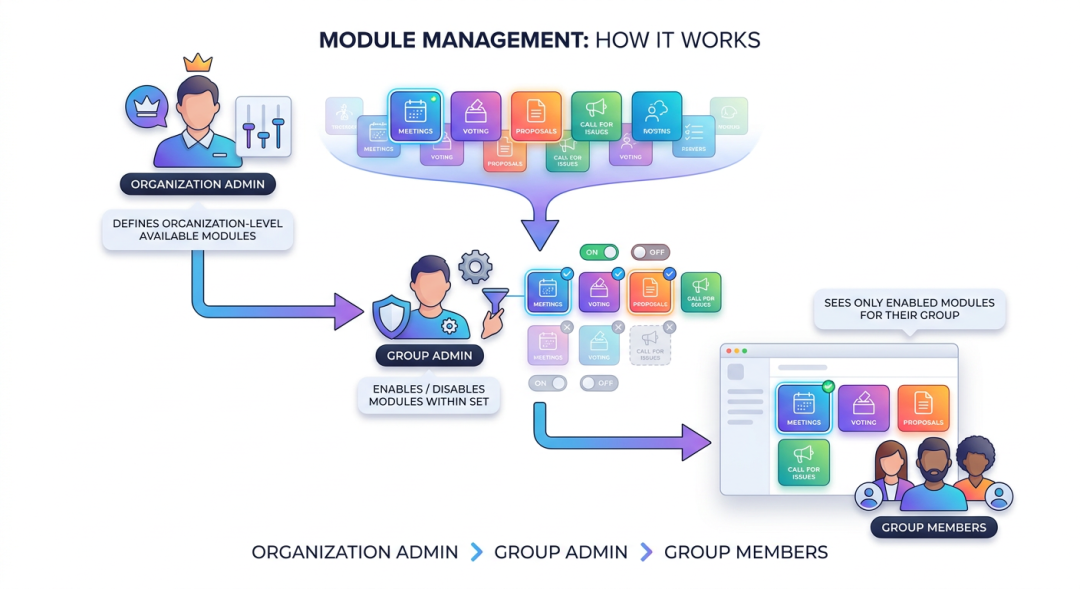
Hierarchical Control:
Organization Administrators
↓ Define which modules are available at org level
Group Administrators
↓ Enable/disable modules within that set
Group Members
↓ See only enabled modules for their groups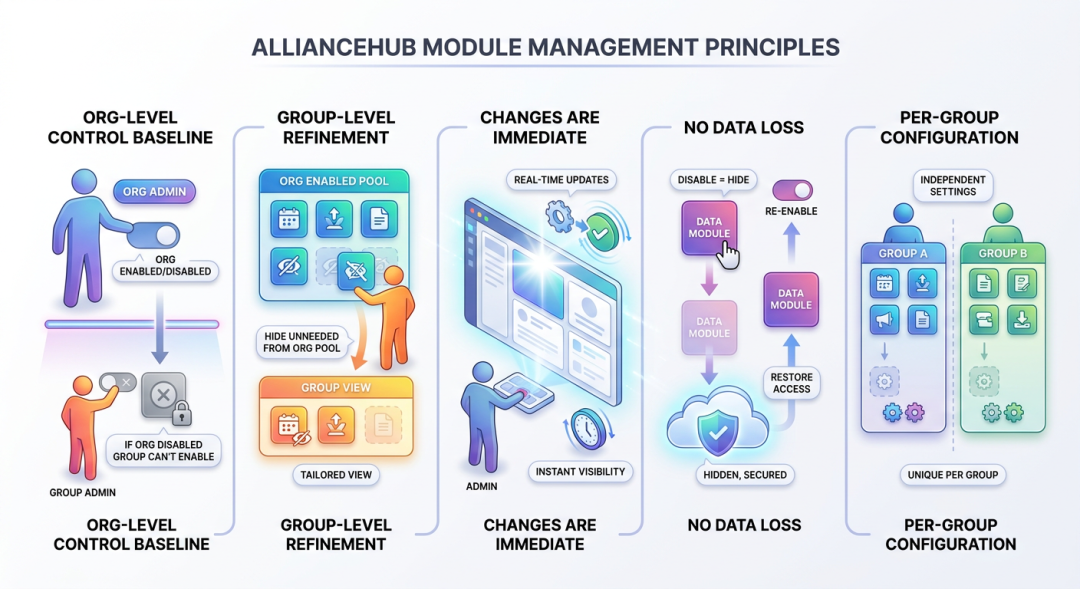 Key Principles:
- Organization-level controls baseline: If disabled at organization level, groups cannot enable it
- Group-level refines within boundaries: Groups hide modules they don’t need from the organization-enabled set
- Changes are immediate: Module visibility updates in real-time
- No data loss: Disabling a module hides it but doesn’t delete existing data—re-enable to restore access
- Per-group configuration: Each group has independent module settings
Practical Configuration Walkthrough
Scenario: International Technology Alliance
This alliance has diverse groups needing different capabilities:
Step 1: Organization-Level Configuration
Organization Administrators decide which modules are available alliance-wide:
| Module | Organization Status | Rationale |
|---|---|---|
| Meetings | Enabled | Everyone needs coordination |
| Ballots | Enabled | Democratic governance |
| Proposals | Enabled | Standards development core |
| Topic Calls | Enabled | Input collection broadly useful |
| Testing/Certification | Disabled | Only certification bodies need this |
| Downloads | Enabled | Document sharing universal |
| Group Management | Enabled | Membership management essential |
Result: Testing/Certification completely unavailable to all groups. Other modules available but groups can hide what they don’t need.
Step 2: Group-Level Configuration
Now group administrators configure their specific groups:
Technical Standards WG:
- Keeps: Meetings, Ballots, Proposals, Downloads, Group Management
- Hides: Topic Calls (work through formal proposals only)
- Result: Standards development toolkit
Regional Americas Chapter:
- Keeps: Meetings, Ballots, Downloads, Group Management
- Hides: Proposals, Topic Calls (not developing standards)
- Result: Regional event and membership focus
Product Certification Group:
- Request: Testing/Certification module (admin enables org-level for this group)
- Keeps: Meetings, Testing/Certification, Downloads
- Hides: Ballots, Proposals, Topic Calls
- Result: Certification workflow focus
Executive Committee:
- Keeps: Meetings, Ballots, Downloads, Group Management
- Hides: Proposals, Topic Calls (strategic, not technical)
- Plus: Private Group enabled for confidential discussions
- Result: Strategic governance platform
Step 3: Member Experience
When members navigate to their groups, they see only relevant modules:
- A standards engineer sees Proposals, Ballots, Meetings
- A regional coordinator sees Meetings, Downloads, Group Management
- A certification specialist sees Testing/Certification, Downloads
- An executive sees Ballots, Private Groups
Each member’s interface matches their actual responsibilities.
Benefits of Strategic Module Management
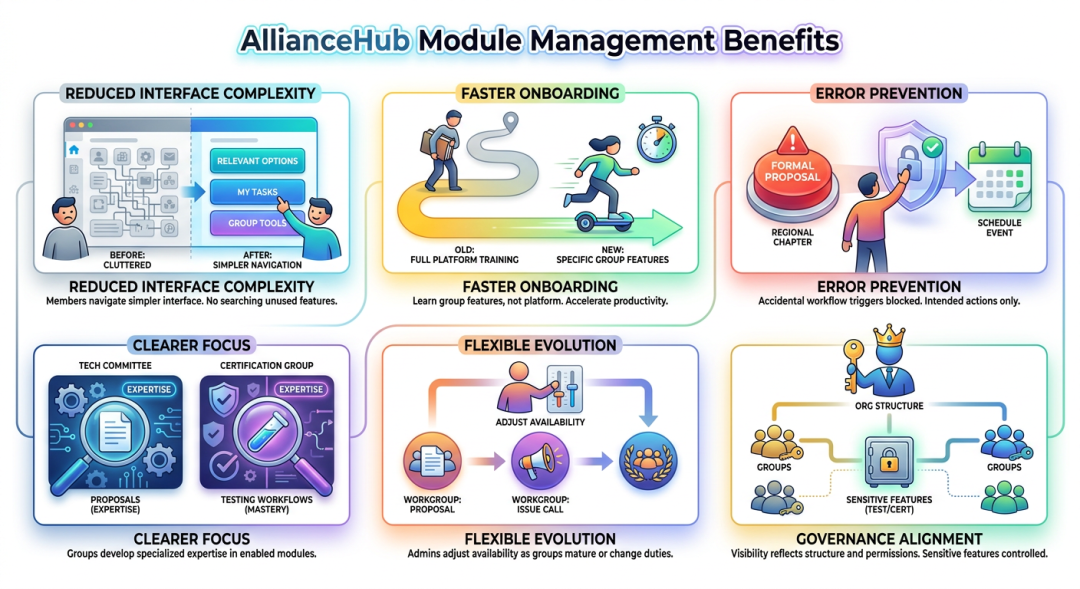
1. Reduced Interface Complexity Members navigate simpler interfaces with only relevant options. No hunting through unused features to find what’s needed.
2. Faster Onboarding New members learn their group’s specific capabilities rather than the entire platform. Reduced training time accelerates productivity.
3. Error Prevention Members can’t accidentally trigger inappropriate workflows. A regional chapter won’t accidentally initiate a formal proposal process when they meant to schedule an event.
4. Clearer Focus Groups develop expertise with their enabled modules. The technical committee becomes proficient with Proposals; the certification group masters Testing workflows.
5. Flexible Evolution As groups mature or responsibilities change, administrators adjust module availability. A working group that outlives its charter can shift from Proposals to Topic Calls.
6. Governance Alignment Module visibility reflects organizational structure and authority. Sensitive capabilities (like Testing/Certification) remain controlled and appropriately distributed.
Best Practices for Module Configuration
 1. Start Conservative Enable core modules organization-wide. Let groups request additional capabilities as needs emerge. Easier to add features than remove them after members become accustomed.
2. Align with Group Charters Configure modules based on each group’s documented purpose. Technical committees need Proposals. Administrative groups need Group Management. Certification bodies need Testing.
3. Communicate Changes When adjusting module availability, notify affected members. Explain what’s changing and why. Provide training for newly enabled capabilities.
4. Review Periodically Alliance needs evolve. Audit module configurations quarterly. Are groups using enabled modules? Do any need capabilities they currently lack?
5. Document Configurations Maintain records of why specific modules are enabled/disabled for each group. This organizational memory helps future administrators understand the rationale.
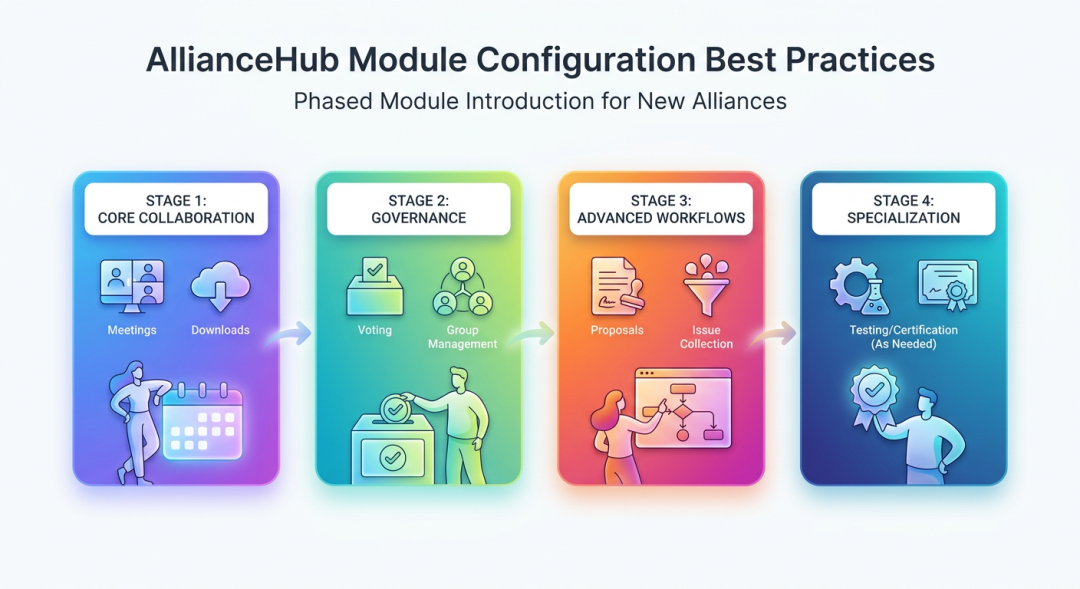
6. Consider Phased Rollouts For new alliances, introduce modules in phases:
- Phase 1: Core collaboration (Meetings, Downloads)
- Phase 2: Governance (Ballots, Group Management)
- Phase 3: Advanced workflows (Proposals, Topic Calls)
- Phase 4: Specialized (Testing/Certification as needed)
Common Configuration Patterns
Standards Organization Pattern:
Org Level: Meetings, Ballots, Proposals, Topic Calls, Downloads, Group Mgmt
Technical WG: All except Topic Calls
Regional Chapters: Meetings, Ballots, Downloads, Group Mgmt
Admin Groups: Meetings, Downloads, Group Mgmt
Research Consortium Pattern:
Org Level: Meetings, Topic Calls, Downloads, Group Mgmt
Research Groups: All
Steering Committee: Meetings, Ballots, Downloads
Admin Groups: All
Trade Association Pattern:
Org Level: Meetings, Ballots, Downloads, Group Mgmt
Member Groups: Meetings, Downloads, Group Mgmt
Executive: All
Events Committee: All except Testing/Certification
Certification Body Pattern:
Org Level: Meetings, Testing/Certification, Downloads, Group Mgmt
Testing Labs: Meetings, Testing/Certification, Downloads
Certification Committee: Testing/Certification, Downloads
Admin: Group Mgmt only
Conclusion
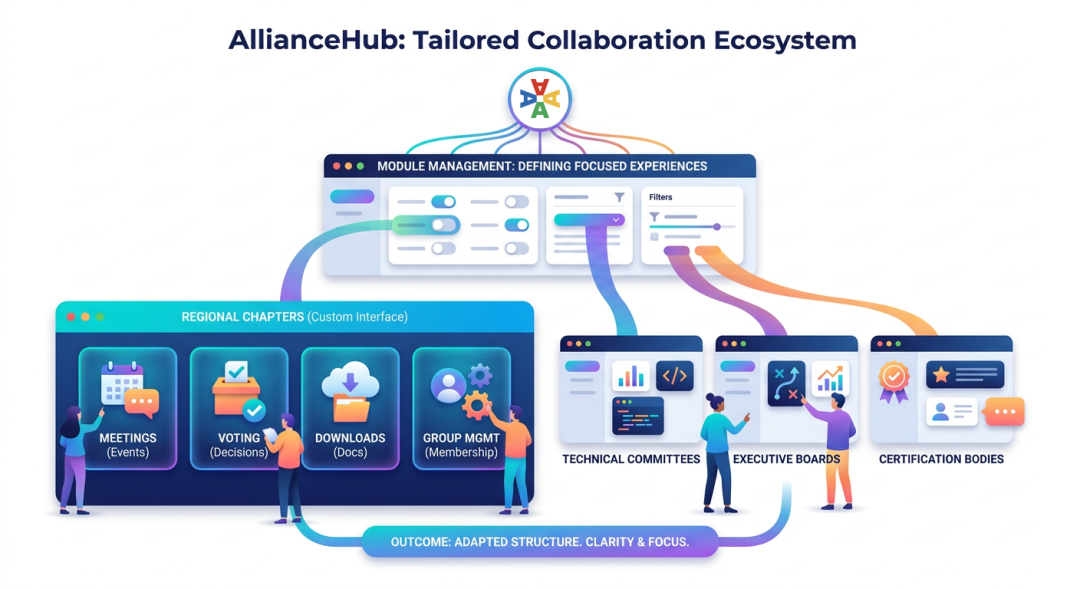 Module Management transforms AllianceHub from a one-size-fits-all platform into a tailored collaboration ecosystem. By showing each group only the capabilities they need, alliance administrators create focused, efficient experiences that match organizational reality.
For international alliances with diverse group types—from technical committees to regional chapters, from certification bodies to executive boards—this flexibility is essential. Each community gets an interface aligned with its charter, accelerating adoption and deepening engagement.
The result is an alliance platform that adapts to your structure rather than forcing your structure to adapt to the platform. Members see what they need, when they need it, without distraction—enabling clearer focus on the collaboration that drives alliance success.